Skip to content

Throw a party:
app, TV, play!

Get the app, put the show on the TV and play. Everyone else just scans the code on the screen, nothing to install, no accounts.

  • over 1800 questions in English
  • over 40 categories
  • Tricks: sabotage a rival's question
  • 16 characters to pick
  • 2 to 12 players, phones are the buzzers
  • A host runs the show

Get the app and put the show on:

  • LG webOS: LG Content Store
  • Samsung Tizen: BuzzinTV app
  • Android TV / Google TV: app on Google Play
  • Philips Titan OS: BuzzinTV app
  • Fire TV: Amazon Appstore
  • Chromecast: cast from the phone app
  • Browser on the TV: open the link, type the code

Or start it right in a browser or on the TV

Scan the code and play!

1

Start the show

Open tv.playbuzzin.com in any browser (laptop, TV) or the BuzzinTV app on LG, Android TV, Philips Titan OS or Fire TV (on Samsung use the TV browser for now, the app is on its way).

2

Scan the code on the screen

Your phone camera is enough. Nothing to install, no accounts.

3

Play!

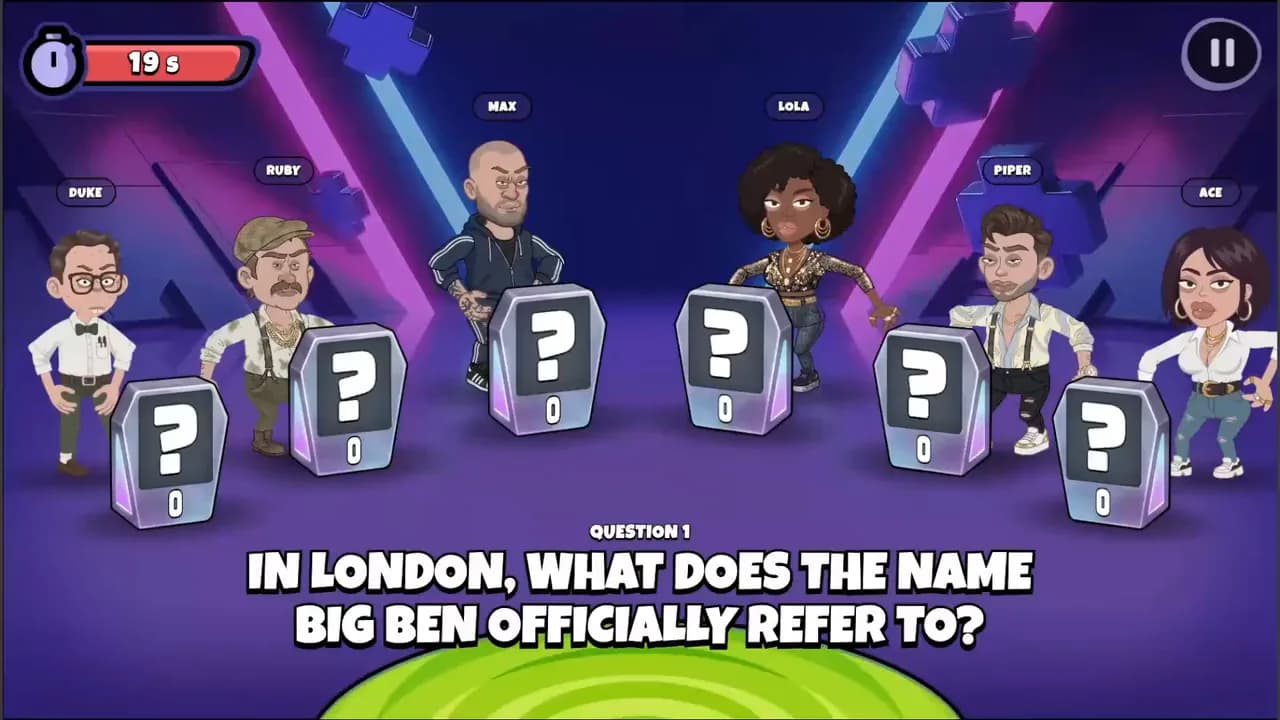
Phones are the buzzers, 2 to 12 people. Host, characters and tricks on the big screen.

What you get

A full show, not tapping on a phone

A host, characters, tricks and an elimination final on the big screen.

Phones as controllers

A/B/C/D buttons and tricks. Nobody can peek at the answers, the game logic lives on the server.

2 to 12 people, no accounts

Everyone joins with the code on the screen. Free for players.

Survives the WiFi

A dropped phone comes back to its seat, and the game pauses and resumes on its own.

Quick questions

No. The TV opens the game in a browser and players join from their phones with the room code. The app is optional, not required.
2 to 12 players around one TV.
Yes. The BuzzinTV app is in the LG Content Store, on Google Play for Android TV / Google TV (incl. Sony, TCL), on Philips Titan OS and in the Amazon Appstore for Fire TV (Samsung Tizen is on its way), and beyond that the game runs in any TV browser or on a laptop plugged into the TV. On the phone the app is optional: App Store and Google Play.
The "Play on TV" button in the app finds Chromecasts and TVs with Chromecast built in (Android TV, Google TV) from iPhone and Android. Phone and TV must be on the same Wi-Fi. LG webOS, Android TV / Google TV, Philips Titan OS and Fire TV have their own BuzzinTV app (Samsung Tizen is on its way): open it on the TV and type the code from your phone. Any other TV opens the game in its browser at tv.playbuzzin.com: you then type the code from the screen into the phone app.

Get the app and put the show on TV

One tap of "Play on TV" and the game show is on the big screen.

Download on the App StoreGet it on Google Play

Get the app and put the show on:

  • LG webOS: LG Content Store
  • Samsung Tizen: BuzzinTV app
  • Android TV / Google TV: app on Google Play
  • Philips Titan OS: BuzzinTV app
  • Fire TV: Amazon Appstore
  • Chromecast: cast from the phone app
  • Browser on the TV: open the link, type the code

The Android robot is reproduced or modified from work created and shared by Google and used according to terms described in the Creative Commons 3.0 Attribution License.

Buzzin - get the app and put the game show on your TV · Buzzin